Nin Online Free UI Overhaul & New Content - Press Release (January 31, 2026)
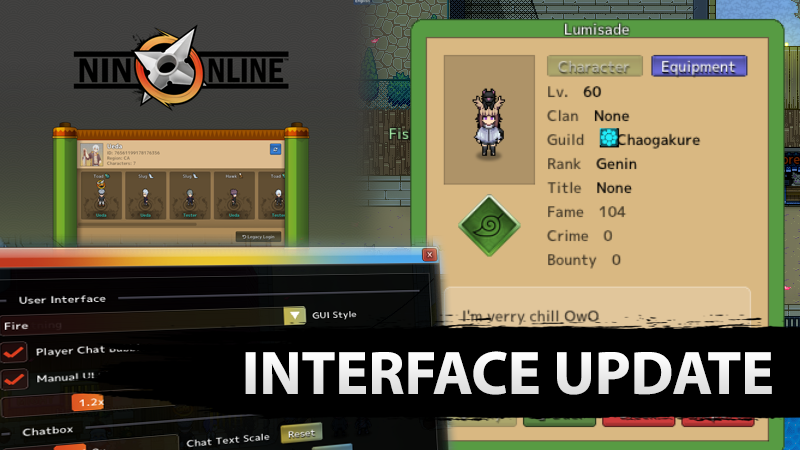
Date: January 31, 2026
Nin Online Receives a Comprehensive Quality‑of‑Life UI Overhaul and New Content
Fight and train with powerful Jutsu to rise through the ranks of your village in a ninja open‑world MMORPG. Join over a hundred thousand players worldwide. Play now for free!
Highlights
- Complete quality‑of‑life overhaul of the Nin Online user interface, focusing on usability, presentation, and customization.
- Full migration of the UI to Dear ImGui - the foundation for all in‑game interfaces, enabling rapid iteration and highly responsive UI systems.
- Redesigned window titles with a fresh visual style, moving away from default Dear ImGui titles.
- Reworked Player Info (right‑click) menu now displays village symbols and animated character portraits.
- Improved text readability and button colour consistency across all supported UI themes.
- Ten brand‑new UI themes added, plus an exclusive dark‑mode login screen that matches the Dark theme.
- Chatbox Transparency Setting now only renders the text area when the box is inactive, reducing visual clutter.
- Localization system rebuilt for real‑time in‑game editing; any player with a “Translator” role can add or correct translations on the fly.
- Admins receive a new tool to deprecate map caches for all players, preventing corrupted maps after map‑format updates.
- Developers gain a new
/sethpdebugging command and expanded hit‑box debugging tools.
New UI Features
- Window‑title design: Custom‑styled titles replace the generic Dear ImGui look.
- Player Info menu: Shows village symbols and a breathing/rotating character animation.
- Button colours: Consistent palette that follows the selected theme.
Theme Enhancements
- Ten new UI themes added to the Interface Menu.
- Dark Theme upgraded from a placeholder to a fully supported, polished theme.
- Exclusive Dark‑Theme login screen that darkens to match the theme.
Chatbox Transparency
The setting now makes only the text‑rendered portion readable when the chatbox is inactive, keeping the background clear.
Localization Overhaul
- Real‑time in‑game localization editor (no longer dependent on external spreadsheets).
- Players with the “Translator” role can add or edit translations directly.
- Auto‑translated base versions now available for Brazilian Portuguese, Spanish, French, German, Korean, Polish, Japanese, and Chinese.
- Single‑press button to push a translation to all languages via auto‑translation.
Admin Tools
Admins can deprecate map caches for all players, clearing outdated caches that previously caused corrupted maps.
Developer Tools
/sethpcommand for debugging health values.- Enhanced hit‑box debugging features and Hitbox Settings Editor improvements.
Balance Adjustments
- Mountain Crusher range increased from 2 to 3 tiles.
- Mountain Crusher now has a 0.5‑second self‑stun and reduced knockback (4 → 3 tiles); its interrupt removed.
- Treat Wounds cast time increased from 1.0 s to 1.2 s.
- Blade Piercing no longer interrupts and no longer applies its effect.
- Crescent Moon Beheading no longer interrupts; now applies Bleeding III (instead of II) and has fixed damage scaling.
- Risky Blade now applies Bleeding I, providing an instant interrupt with lower cooldown.
New Cosmetic Content
- Saber Premium Hairstyle (art by Fuze).
- Shark Tooth Rings (art by Luhan).
- First Crit Rings in the game.
Visual & UI Changes
- Animations added to store‑furniture (thanks Fentomaru).
- Blessing UI now only halts movement while typing, not for the entire window’s active period.
- Fireflies render above the night‑time darkness overlay, making them more vibrant.
- New outline and improved styling for the minimap.
- Cash Shop item preview fixed to stop showing unintended items when the mouse is released after moving the cursor.
- Long player names in the pink private‑message box are now shortened to fit.
- Projectiles and melee attacks on NPCs with large hitboxes now play hit animations on the exact body part struck.
- Spectator‑camera mode (Steam broadcast) characters no longer invisibly interfere with capture points.
Other Adjustments
- Overlapping frame issue on Stylish Kunai Pants fixed (thanks Fentomaru).
- Backend map‑editor crash fixed.
- Graceful handling of backup web‑server ping listings added.
Bug Fixes
- Messenger Hawk UI typo fixed - typing no longer causes unintended movement or casting.
- NPC flickering delay bug resolved.
- Server crash caused by NPC platforming fixed.
- NPC invisibility after the Body Flicker Technique corrected.
- UI bugs triggered by clicking button tabs fixed.
- Food items now correctly consume when used.
- Large NPC hitbox issues fixed - animations now trigger on the correct body part.
- Wind Claw and Wind Mask Technique no longer interrupt the target’s casting.
- Cash Shop item preview respects cursor release, preventing accidental previews of unintended items.
- Chatbox transparency setting now renders correctly.
- Blessing UI movement restriction shortened to only the typing period.
- Spectator Camera mode characters no longer interfere with capture points during Steam broadcasts.
- Map Editor backend crash resolved.
- Graceful handling of backup web server ping added.
More Information
For full details, see the official announcement: https://steamcommunity.com/games/1674010/announcements/detail/499470950023037623